We have many SuiteCRM Alternatives but SuiteCRM remains one of the better-known open-source CRM platforms for businesses that want control over their customer data, customization, and deployment. It provides modules for accounts, contacts, leads, opportunities, cases, campaigns, activities, reporting, and more.
However, SuiteCRM isn’t the right fit for every organization.
Some businesses want a more modern user experience. Others are looking for built-in AI capabilities, simpler cloud deployment, stronger marketing automation, broader business applications, or a CRM that requires less technical administration.
That has led many businesses to search for SuiteCRM alternatives.
In this guide, we’ll compare 10 CRM platforms and explain what to consider before moving away from SuiteCRM — including open-source options, commercial CRMs, AI-powered platforms, customization, hosting, integrations, and total cost of ownership.
Quick Comparison of SuiteCRM Alternatives
| CRM | Best suited for | Open Source | Self-Hosted | AI Capabilities | Customization |
|---|---|---|---|---|---|
| SuiteCRM | Open-source CRM & customization | ✓ | ✓ | Via integrations/add-ons | High |
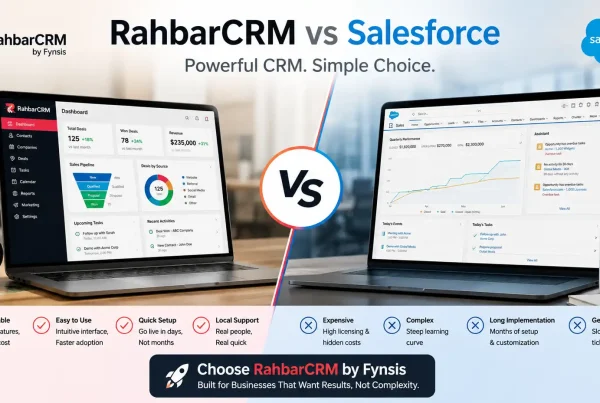
| RahbarCRM | Open-source CRM with AI | ✓ | ✓ | ✓ | High |
| Salesforce | Enterprise sales organizations | — | — | ✓ | High |
| HubSpot CRM | Marketing & sales teams | — | — | ✓ | Medium |
| Zoho CRM | SMBs and growing businesses | — | — | ✓ | High |
| Microsoft Dynamics 365 | Microsoft-centric enterprises | — | — | ✓ | High |
| Odoo CRM | Businesses needing an integrated business suite | ✓ | ✓ | ✓ | High |
| EspoCRM | Lightweight open-source CRM | ✓ | ✓ | Via integrations | High |
| Freshsales | Sales-focused teams | — | — | ✓ | Medium |
| Pipedrive | Pipeline-focused sales teams | — | — | ✓ | Medium |
Features and deployment options can change by edition, plan, module, or integration, so businesses should verify current vendor documentation before making a purchasing decision.

Why Look for SuiteCRM Alternatives?
SuiteCRM is designed around flexibility and open-source control. Its official documentation describes it as an open-source CRM that centralizes customer and prospect information and supports sales, service, activities, campaigns, and other CRM processes.
It also provides an open API and extensive customization capabilities.
So why would a company consider switching?
The reasons are usually less about whether SuiteCRM works and more about whether it fits the organization’s current requirements.
Common reasons include:
1. Need for more modern AI capabilities
AI is increasingly becoming part of CRM workflows.
Businesses may want AI to:
- summarize customer interactions
- analyze CRM data
- qualify leads
- automate email processing
- answer questions about CRM records
3. Cloud-first requirements
Some companies prefer a fully managed SaaS CRM where infrastructure, upgrades, backups, and maintenance are handled by the vendor.
2. User experience requirements
SuiteCRM offers extensive functionality, but organizations may prefer a different interface or workflow depending on their users and industry.
4. Industry-specific workflows
A generic CRM may require significant customization when a company operates in industries such as:
- Legal
- Healthcare
- Real estate
- Education
- Financial services
- Professional services
10 SuiteCRM Alternatives to Consider in 2026
1. RahbarCRM
Best for: Businesses looking for an open-source, self-hosted CRM with AI capabilities.
RahbarCRM is an open-source AI CRM developed by Fynsis Softlabs. It combines CRM functionality with AI-powered automation, insights, integrations, and self-hosted deployment.
It is particularly relevant for organizations that like the philosophy of open-source CRM but want to incorporate AI into their daily CRM workflows.
Key capabilities include:
- Lead and sales management
- AI insights
- AI workflow automation
- Self-hosted deployment
- WhatsApp integration
- Email AI
- Knowledge-based AI
- Business integrations
- Custom workflows
- API-based integrations
- Customer support functionality
RahbarCRM also provides a Community Edition with self-hosted deployment and unlimited usage, while enterprise services can include implementation, AI modules, integrations, hosting, security setup, and data migration.
Why consider RahbarCRM?
For organizations that don’t want to choose between open-source flexibility and modern AI functionality, RahbarCRM is an option worth evaluating.
2. Salesforce
Best for: Large organizations requiring an extensive commercial CRM ecosystem.
Salesforce is one of the most established enterprise CRM platforms and provides a broad ecosystem covering sales, service, marketing, analytics, automation, and AI.
Unlike SuiteCRM, Salesforce is a proprietary cloud platform rather than an open-source CRM.
Businesses considering Salesforce should therefore evaluate:
- Licensing costs
- User-based pricing
- Implementation costs
- Customization requirements
- Data governance
- Integration requirements
- Vendor dependency
For large organizations with complex requirements, Salesforce can be considered alongside SuiteCRM and other enterprise CRM platforms.
3. HubSpot CRM
Best for: Businesses combining CRM, marketing, sales, and customer engagement.
HubSpot takes a different approach from SuiteCRM by combining CRM functionality with a broader marketing and sales platform.
It can be attractive to organizations that want:
- Marketing automation
- Lead management
- Sales pipelines
- Email marketing
- Customer engagement
- Reporting
- Sales automation
The trade-off is that businesses should carefully evaluate which features they need and how their costs may evolve as their requirements and user base grow.
4. Zoho CRM
Best for: Small and mid-sized businesses looking for a broad cloud CRM ecosystem.
Zoho CRM provides sales automation, lead management, workflow automation, reporting, integrations, and AI-assisted functionality.
It is particularly relevant for companies already using other Zoho applications.
The biggest distinction from SuiteCRM is the deployment and business-model approach: Zoho is primarily a commercial SaaS ecosystem, while SuiteCRM is open source and can be self-hosted.
5. Microsoft Dynamics 365
Best for: Organizations deeply invested in Microsoft’s business ecosystem.
Microsoft Dynamics 365 combines CRM and business applications with Microsoft’s broader ecosystem.
It can be considered when a company already relies heavily on:
- Microsoft 365
- Azure
- Teams
- Power Platform
- Business Central
- Microsoft data and analytics tools
For organizations with sophisticated enterprise requirements, Dynamics 365 can become a substantial platform rather than simply a CRM replacement.
6. Odoo CRM
Best for: Businesses looking for CRM combined with broader business management applications.
Odoo is different from SuiteCRM because CRM is part of a much larger business application ecosystem.
Depending on the deployment and modules selected, businesses can use Odoo for areas such as:
- CRM
- Sales
- Accounting
- Inventory
- Manufacturing
- Website
- eCommerce
- Marketing
- HR
For businesses that want their CRM closely connected to operational applications, Odoo can therefore be an alternative worth evaluating.
Odoo also maintains an open-source ecosystem and supports different deployment approaches.
7. EspoCRM
Best for: Businesses looking for a lightweight open-source CRM.
EspoCRM is another open-source CRM platform that can appeal to organizations prioritizing customization and self-hosting.
Businesses evaluating EspoCRM against SuiteCRM should look closely at:
- Required modules
- UI preferences
- Developer ecosystem
- Integrations
- API requirements
- Workflow requirements
- Support requirements
For smaller implementations, the simplicity of a CRM can sometimes be just as important as the number of features available.
8. Freshsales
Best for: Sales teams wanting a modern cloud-based sales CRM.
Freshsales focuses heavily on sales management, automation, communication, and AI-assisted sales workflows.
It can be considered by businesses that prioritize:
- Sales pipelines
- Lead management
- Sales automation
- Cloud deployment
- AI-assisted productivity
However, organizations requiring deep self-hosting or open-source customization will need to look at fundamentally different platforms.
9. Pipedrive
Best for: Sales teams primarily focused on pipeline management.
Pipedrive is designed around sales pipelines and sales activities.
It can make sense for organizations where the primary CRM requirement is:
“Give our sales team a simple way to manage leads, deals, activities, and follow-ups.”
That is a different philosophy from SuiteCRM, which provides a broader and highly customizable CRM framework.
10. Stay With SuiteCRM and Customize It
This is an option businesses often overlook.
If your company is already running SuiteCRM, switching CRM platforms isn’t necessarily the best answer to every problem.
SuiteCRM is open source, supports customization, provides an open API, and can be extended through modules and integrations.
Instead of migrating your data and retraining your entire organization, you may be able to improve the existing implementation.
For example:
- Customize CRM modules
- Build new workflows
- Integrate WhatsApp
- Connect accounting software
- Improve dashboards
- Add AI functionality
- Automate email processing
- Build custom reports
- Integrate your website
- Create customer portals
- Connect third-party APIs
This is particularly important because the cost of switching CRM platforms is not just the subscription price.
It can also include:
- Data migration
- Development
- Integration
- Testing
- Training
- Process redesign
- User adoption
- Historical data validation
How to Choose the Right SuiteCRM Alternative
Choosing a CRM should depend on your business requirements rather than simply the number of features a platform offers.
Before moving from SuiteCRM, consider these factors:
Open Source vs. Proprietary
If you need source-code access, greater control over your data, and the ability to customize the platform, open-source CRM solutions may be worth considering. Proprietary CRMs can provide a more managed experience but may involve greater vendor dependency.
Self-Hosted vs. Cloud
Determine whether your business requires an on-premise or self-hosted CRM, or whether a fully managed cloud platform is more suitable. Consider your requirements for data control, security, maintenance, backups, and infrastructure management.
AI and Automation
Modern CRM teams increasingly use AI for lead qualification, email processing, customer support, reporting, data analysis, and workflow automation. Evaluate what AI capabilities are actually available and whether they integrate with your existing business processes.
Customization and Integrations
Check whether the CRM can support your existing workflows, custom modules, APIs, websites, accounting software, communication channels, and other business applications.
Total Cost of Ownership
Don’t compare CRM platforms only by their subscription price. Consider implementation, customization, integrations, hosting, maintenance, migration, training, and ongoing support when calculating the total cost.
Should You Switch From SuiteCRM?
Not every SuiteCRM problem requires moving to another CRM.
If your existing SuiteCRM installation already contains years of customer data, customized workflows, integrations, and business processes, migrating to a completely different platform can introduce additional implementation and data-migration work.
In many cases, the requirement can be addressed by extending the existing SuiteCRM installation.
For example, businesses can add:
- AI-powered email processing
- Automated lead assignment
- AI-generated customer insights
- WhatsApp and chatbot integrations
- Custom dashboards and reports
- Website and lead-generation integrations
- Accounting and third-party integrations
- Custom modules and workflows
The right decision depends on whether your current CRM can be adapted to your business requirements and how much change your organization is prepared to undertake.
Before migrating, evaluate both options: replacing your CRM and improving your existing SuiteCRM implementation.
Final Thoughts
There are many SuiteCRM alternatives available in 2026, ranging from enterprise platforms such as Salesforce and Microsoft Dynamics 365 to cloud CRMs such as HubSpot and Zoho, as well as open-source options such as Odoo and EspoCRM.
The right choice depends on your business size, budget, deployment requirements, customization needs, integrations, and long-term CRM strategy.
If you already use SuiteCRM, however, switching platforms isn’t always necessary. A customized implementation with modern integrations, automation, and AI capabilities may provide a practical way to extend the CRM you already have.
If you are evaluating SuiteCRM alternatives, SuiteCRM customization, AI integration, or CRM migration, Fynsis can help you assess your current CRM environment and identify the right approach for your business.
Need help with your SuiteCRM setup? Talk to Fynsis about customization, AI integration, and CRM development.